

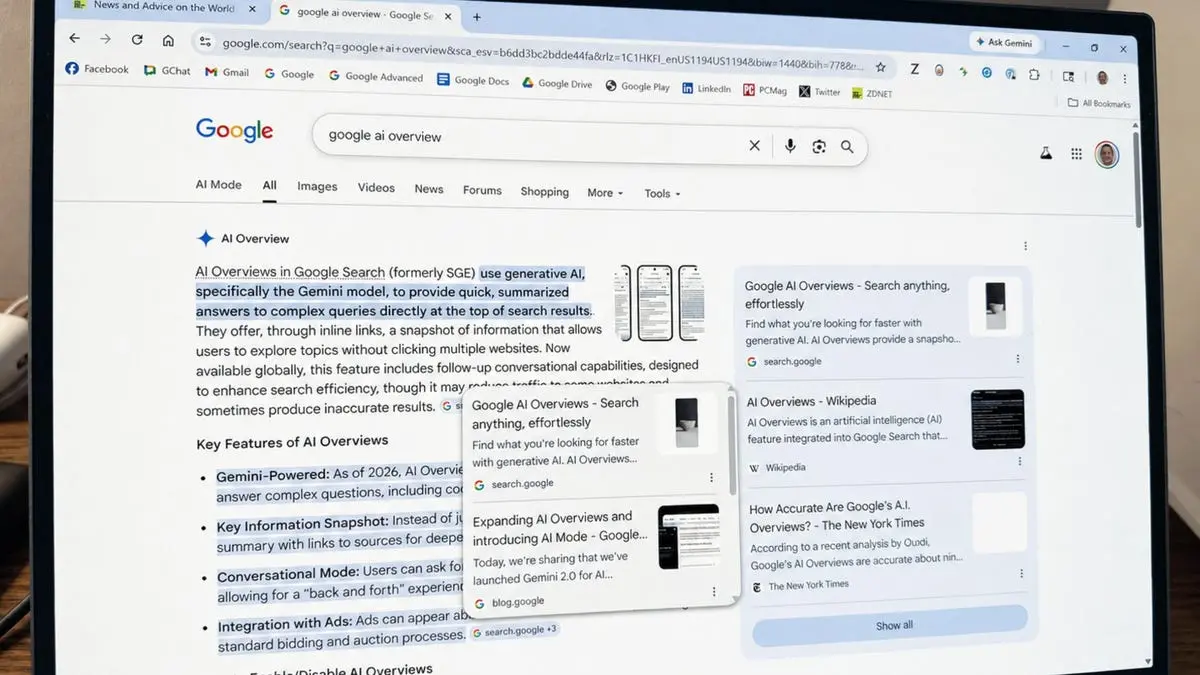
Google's AI Overviews, the generative AI feature that summarizes search results, has become a go‑to tool for millions of users seeking quick answers. However, the summaries often lack depth, and users must dig into the original sources to get the full picture. To address this, Google has introduced five new features that make AI Overviews far more useful, transparent, and connected to the wider web.
1. View advice from other people
One of the most requested additions is the ability to see firsthand advice from real people. When you search for a topic, AI Overviews now include a section called Expert Advice. This section pulls in brief comments from discussion forums, social media threads, and other online communities. For example, if you're wondering what to feed a cat with a sensitive stomach, the overview may show a snippet from a fellow cat owner's forum post, complete with a link to the full conversation. This feature leverages the collective knowledge of niche communities, giving users access to practical, experience‑based insights that pure algorithmic summaries cannot provide.
Google demonstrated the feature with an example: searching for the best techniques to photograph the northern lights might surface advice from a photography forum on exposure settings and timing. Each comment is attributed to the person or forum, and clicking the link takes you directly to the source. This not only enriches the search experience but also drivestraffic to community platforms, encouraging more diverse content creation.
2. Access your news subscriptions
For users who rely on specific news outlets, accessing subscription‑gated articles has always been a hassle within AI Overviews. The latest update solves this by highlighting links to your subscribed news sources directly in AI Mode and AI Overviews. When you run a search, any story from a publication you subscribe to (e.g., ZDNET, The New York Times) will be prominently labeled, making it easy to click through and read the full article.
Early tests by Google showed that users are significantly more likely to click on links that are flagged as part of their subscriptions. This is a win‑win: users get seamless access to content they already pay for, and publishers benefit from increased engagement and reader loyalty. Publishers can set up this feature through Google's Subscription Linking page, ensuring their subscribers see the relevant links in AI search results.
3. See links to the sources in the summary
AI models are known to hallucinate or misinterpret information. To combat this, Google now places clickable links directly next to the relevant text within the AI summary. Instead of only seeing a vague reference at the bottom, you can now see, for instance, a bullet point about bike‑trip terrain linked to a specific Pacific Coast touring guide, or a point about daily mileage linked to a blog post on training.
This inline linking makes verification instantaneous. Users can hover over or click the link to jump to the exact source, dramatically reducing the time spent cross‑checking facts. For Google, this is a critical step in building trust – it acknowledges that AI can err and provides the tools to verify claims without leaving the search experience.
4. Explore additional sources
Beyond the sources used to create the summary, users often want to dive deeper into a topic. The new Explore additional sources section appears below the AI summary and offers a curated list of articles, case studies, or analyses on related aspects of the query.
For example, if you search for how cities are increasing green spaces, the section might suggest a case study on Seoul's stream restoration project or a report on the design of New York City's High Line park. This not only broadens the context but also exposes users to high‑quality, diverse content they might not have otherwise found. It effectively turns the AI Overview into a launchpad for further exploration.
5. Preview linked websites in the summary
Many users are hesitant to click on unfamiliar links. To reduce that friction, Google now provides a quick preview when you hover over a link in the AI Overview. The preview shows the name or title of the website, giving you a sense of its credibility and relevance before you commit to clicking.
This small but impactful feature addresses a common pain point: link anxiety. By offering a preview, Google helps users make more informed decisions about where to go next. It also encourages publishers to maintain clear, descriptive page titles to attract clicks.
Google emphasized that these enhancements are part of a broader effort to improve the visibility and helpfulness of links in generative AI search. Techniques like query fan‑out allow the system to dive deeper into the web to find the most relevant sites. By showcasing original voices – from forum members to news reporters – Google aims to build a search experience that not only answers questions but also connects users directly to the richness of the internet.
With these five features, AI Overviews evolve from a simple summary tool into a gateway that encourages exploration, verification, and community engagement. The update is rolling out gradually, and users are encouraged to check their settings to enable the new options. As search becomes more AI‑driven, Google is clearly betting that transparency and source diversity will keep users coming back.
Source: ZDNET News